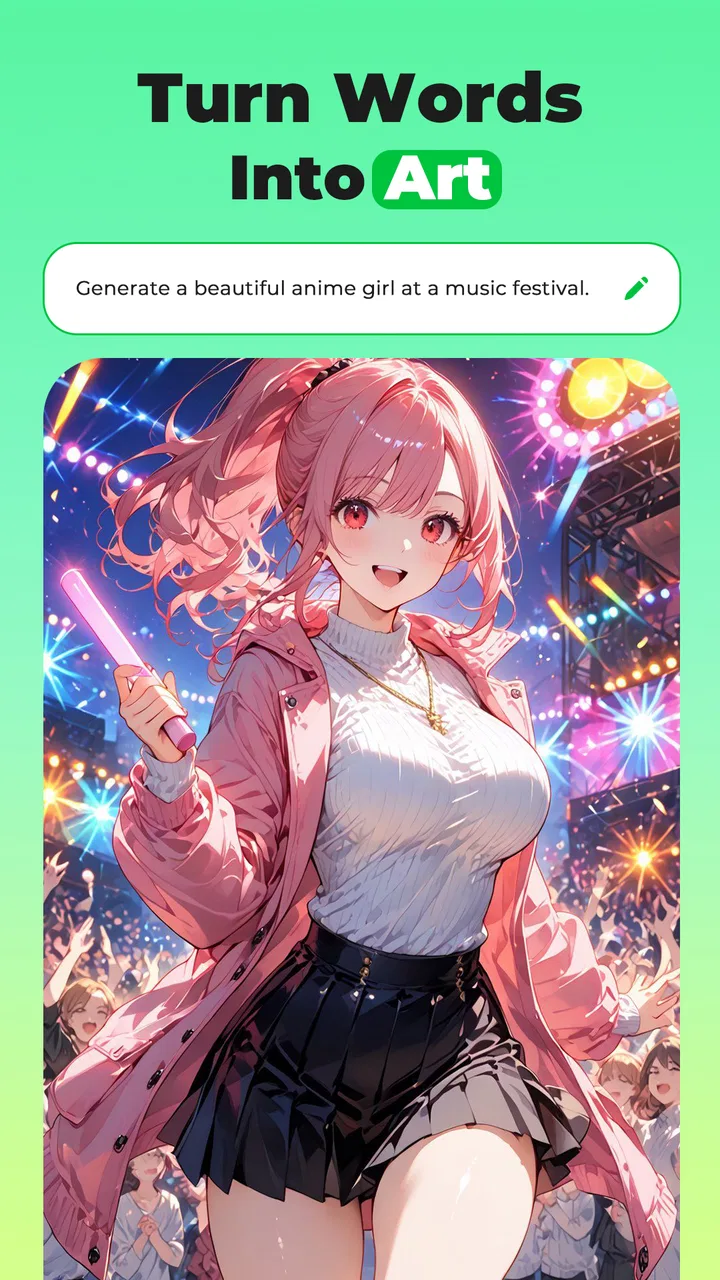
ETM: AI Image Generator
- 3.5
- Rating
- 1.00M
- Installs
- Free
- Price

 Analysis by App-foxy
I approached ETM: AI Image Generator as a photography app for people who want to transform ordinary selfies and sketches into stylized artwork without learning a full editing program. After spending time with its different creative directions, my impression is mixed but useful: it can be an enjoyable shortcut for quick visual experiments, yet it is not the kind of tool I would choose when privacy controls, precise editing, or predictable professional output are my first priorities.
The app is developed by ArtVibe Labs and is available for free, with optional purchases ranging from $2.99 to $79.99 per item. That combination makes the first step easy, but it also means I would pay close attention to what is included before committing to repeated use. ETM is rated for Mature 17+, runs on Android 7.0 or later, and its current version is 2.00.10. Those details matter because this is an image-making app that may appeal to a wide audience, while the age classification tells parents and cautious users to examine the experience rather than assuming it is suitable for everyone.
What using ETM feels like in everyday photography
The basic appeal is immediate. I can start with a selfie or a sketch and aim for an anime-like, comic, three-dimensional, or more realistic result. That makes ETM less intimidating than a traditional photo editor: instead of adjusting many sliders, I am asking for a visual reinterpretation. For a quick profile experiment, a playful image to send to a friend, or a rough idea for a character, that change in approach is genuinely convenient.
You May Also Like

 Blood Strike: 2.5 Anniversary
Blood Strike’s Loadouts Turn Every Drop Into a Tactical Gamble
A close look at Blood Strike’s custom loadouts: how fast access to signature weapons reshapes its battle royale rhythm, rewards preparation, and narrows the gap between fights.

 Pandora - Music & Podcasts
Pandora’s Music Is Easy to Start, but Harder to Recover
Pandora’s strength is its low-effort path from a seed to a station. Its weak spot is how much confidence it asks you to place in connection, setup, and quiet recovery.

 8 Ball Pool
 Is Built on Rivalries, Rematches, and Routine
A close look at the rivalries, rematches, shared routines, and unanswered safety questions that turn a quick pool match into a persistent mobile community.

 Samsung Music
’s Quiet Strength Is Playing What You Already Own
Its reach comes less from spectacle than from dependable access to a personal library. That simplicity is both the app’s strongest retention engine and its ceiling.

 AccuWeather: Weather Radar
AccuWeather Review: A Quick, Clear Forecast for Everyday Decisions
For everyday plans, the best forecast is the one you can understand quickly. AccuWeather makes rain timing, radar, and local conditions easy to act on, with a few trade-offs.

 Hill Climb Racing
Why Hill Climb Racing Still Turns Crashes Into One More Run
A tiny car, a bumpy hill and one more upgrade: Hill Climb Racing keeps resurfacing because its simple chaos makes every near-miss feel personal.
More From Our News Desk



In a normal photography workflow, I might crop a portrait, correct lighting, remove distractions, and then add a filter. ETM sits earlier in the creative process. It is better understood as a transformation tool than as a complete replacement for a camera editor. The strongest reason to open it is not to make a faithful copy of a photograph, but to see how the same source can look when pushed toward a different visual identity.
I found that distinction important. If I wanted a clean, natural portrait with exact control over skin tone, shadows, hair edges, and background separation, a conventional editor would be more dependable. If I wanted several imaginative directions from one starting point, ETM was more interesting. The trade-off is control: the more the app changes the source, the less I can expect every facial detail or sketch line to remain exactly where I placed it.
Where the app is most useful
A realistic everyday scenario would be preparing a small set of social profile ideas. I could take one well-lit selfie, try a comic treatment for a playful account, an anime treatment for a fandom community, and a more realistic variation for a less dramatic look. Rather than spending an evening learning layers and masks, I would get a fast set of directions to compare. I would still inspect each result carefully before sharing it, especially if recognizable facial details matter.
Sketch users have a different reason to try it. A rough drawing can be a starting point for visual exploration, helping me imagine how a simple concept might look in a more finished style. I would not treat the output as a replacement for drawing skill or a final illustration workflow, but it can help break a creative block. The useful question is not “Is this the finished artwork?” but “Does this suggest a direction worth developing myself?”
The app also suits people who enjoy novelty more than consistency. When I want a quick surprise, an AI transformation can be entertaining. When I need the same character to look identical across a series of images, or when a client expects exact revisions, I would choose a tool built around manual control and repeatable editing instead.
How the different styles affect expectations
Anime and comic treatments are likely to feel more forgiving because stylization naturally allows changes to proportions, outlines, and facial emphasis. A result can look appealing even when it is not a literal match for the source. The realistic direction has a higher burden: small changes to eyes, expression, texture, or lighting are easier to notice. I would judge realistic results more strictly and keep the original beside the transformed version before deciding whether it is suitable for public use.
The three-dimensional look can be useful when I want a character-like interpretation rather than a normal portrait. It may work well for playful avatars or concept references, but it is not automatically the same as a carefully modeled 3D asset. That distinction prevents disappointment. ETM gives me an image with a 3D-inspired appearance; it does not turn a selfie into a production-ready model that I can rotate or edit as a true object.
One practical tip is to begin with a simple source rather than a crowded photograph. A face that is clearly visible, with reasonable lighting and limited background distraction, gives the transformation a better chance of preserving the features I care about. For sketches, I would make the main shapes readable before importing them. Extra detail is not always helpful when the app is trying to interpret the drawing as a visual foundation.
Trust begins with what I can actually verify
Because ETM works with personal images, I would not judge it only by the visual results. Trust here depends on visible choices: what the app asks me to allow, whether I can decide which image to use, whether account controls are clear, and whether the app explains how submitted material is handled. I would review those screens directly on my device before uploading a sensitive portrait or a drawing that belongs to someone else.
I would also avoid treating a free download as risk-free. The app costs nothing to install, but optional purchases are part of the experience, and the listed purchase range is broad. Before starting a repeated workflow, I would check which creative actions remain available without payment and whether a purchase is a one-time unlock or connected to a particular item. I would not assume that a visually impressive preview means the complete process is free.
The public reach of the app is substantial, with over a million installs and an average rating of 3.5 from around sixteen thousand ratings. I see that as a reason to investigate rather than as proof of quality or safety. A large audience shows that the concept attracts people, while the middling average suggests that the experience may not satisfy everyone equally. I would read recent user feedback for clues about the exact workflow I plan to use, especially image handling and purchase expectations.
Permissions, accounts, and personal images
When I test a photography app, I separate necessary access from convenience. ETM may need access to an image I deliberately choose, but I would still pay attention to whether the system presents a narrow picker or asks for broader library access. If Android offers a choice between selected photos and an entire collection, I prefer the narrower option. That gives me more control without preventing the main task.
I would use the same caution with the camera. If I only want to transform an existing selfie, I would not grant camera access until I actually need to capture a new one. This is a simple habit, but it keeps the app’s access aligned with my purpose. I would also check the operating system’s permission manager afterward, because permissions can be reviewed and adjusted independently of the app’s own screens.
Account controls deserve similar attention. If ETM offers sign-in, I would look for a clear way to manage the account, change access, or remove it. I would avoid creating an account merely to test one image unless the benefit is obvious to me. If the app can be used without an account, that would be my preferred starting point for a low-commitment trial. If sign-in becomes necessary, I would read the available choices instead of rushing through them.
Most importantly, I would not upload somebody else’s face without permission. A friend may enjoy seeing a comic version of a shared photograph, but that does not automatically mean I should submit it to an image service. The same applies to children, private family pictures, workplace documents, and sketches that contain confidential ideas. ETM is more appropriate for material I own or have clear permission to process.
Data-sensitive moments in a creative workflow
The sensitive moment is not only installation. It happens whenever an image leaves the familiar boundaries of my phone and enters a transformation process. Before choosing a source, I would remove visible information that is irrelevant to the result: addresses, badges, school details, private screens, or other people in the background. Cropping first can improve privacy and sometimes improves the artistic result at the same time.
I would also keep expectations realistic about the original file. If the app creates a transformed copy, I would save only the versions I actually want and remove unnecessary exports from my device. I would not assume that deleting a local copy automatically controls any other copy involved in processing. That is why I would inspect the app’s privacy explanation and available deletion choices before using it for sensitive material.
For a casual test, I would choose a non-sensitive image with no identifying background. That lets me evaluate the style and workflow without exposing something personal. Once I understand the controls, I could decide whether the convenience is worth using it for more meaningful photos. This staged approach is more sensible than beginning with a passport-like portrait, a private family scene, or an unpublished client concept.
Another practical trade-off is quality versus exposure. A high-resolution image may produce a more useful result, but it can contain more detail than I need to share. I would consider reducing the image to a sensible working size and removing metadata through a separate, trusted workflow when appropriate. That does not solve every privacy question, but it limits unnecessary information and keeps the experiment focused on the visual content.
What I would do before paying
The purchase range makes testing discipline worthwhile. I would first decide what I need: occasional style experiments, regular avatar creation, sketch exploration, or a more serious image workflow. Then I would try the free path with a harmless sample and note where the app asks for payment. I would not purchase simply because a preview looks promising, especially if I have not yet checked export quality, image ownership expectations, or whether the style remains useful after several attempts.
I would also confirm the billing details shown by the platform at the moment of purchase. The listed range runs from a small amount to a much larger amount per item, so the difference between an occasional add-on and a substantial commitment matters. I would use the device’s purchase authentication and review controls, particularly if other people can access the phone. A free app with optional purchases deserves the same spending caution as any other creative tool.
For someone who creates images every day, it may be worth comparing the cost of repeated ETM purchases with a conventional editor or another generator that offers a clearer long-term plan. For someone who only wants a few playful transformations, paying for a single useful result may be easier to justify, but only when the terms and output are clear. My advice is to treat payment as a separate decision from liking the first preview.
Limitations I noticed in the overall concept
The largest limitation is the gap between speed and precision. ETM can make an idea feel accessible, but fast transformation does not guarantee faithful anatomy, consistent identity, or exact preservation of a sketch. I would be comfortable using the results for personal experimentation and casual sharing after checking them. I would be cautious about presenting them as untouched portraits, technical artwork, or final commercial assets.
Another limitation is that AI-style results can make decisions I did not request. A face may become more dramatic, a drawing may gain a different visual emphasis, or a realistic treatment may look less like the source than expected. That can be part of the fun, but it can also be frustrating when I have a specific target. If I need to correct one small feature without changing everything else, a layer-based editor is usually the better choice.
The age classification is also relevant to how I recommend it. Since the app is marked Mature 17+, I would not present it as a general children’s creativity tool. Parents should check the app directly and use the platform’s family controls rather than relying on the fact that the basic idea sounds harmless. Adults should likewise remember that transforming a person’s image can raise consent and privacy questions even when the result is intended as a joke.
Finally, the average rating of 3.5 is a useful warning against overpromising. It is not a poor score, but it suggests a divided experience. Some people will value the speed and variety, while others may dislike limitations, payment prompts, inconsistent results, or the amount of control available. I would go in expecting an experimental companion, not a polished replacement for every photography or illustration tool.
Who should try it, and who should skip it
I would recommend ETM to a curious Android user who enjoys testing visual styles, wants a quick avatar idea, or has sketches that could benefit from a new interpretation. It is especially appealing when the goal is exploration rather than exact reproduction. The low barrier to entry makes it easy to see whether the concept fits a personal creative habit.
I would suggest skipping it if the main requirement is detailed manual retouching, predictable professional delivery, or strict control over how a person’s likeness is represented. I would also choose another route for confidential images, sensitive family photos, or any project where the data-handling explanation and account controls do not feel clear enough. A conventional editor may take longer, but it keeps more decisions in my hands.
For iPhone users, I would not assume that an Android-focused technical detail automatically describes the iOS experience. I would check the relevant platform page and its permission prompts before installing. The important principle remains the same: use a controlled test image, inspect the available choices, and decide whether the creative benefit justifies the access and purchase conditions shown on the device.
My cautious verdict after testing the idea
ETM: AI Image Generator is a fun, accessible photography app when I want to turn a selfie or sketch into a quick visual experiment. Its anime, comic, 3D-inspired, and realistic directions give it more personality than a basic filter collection, and the free entry point makes trying it straightforward. I can imagine returning to it when I need a playful concept rather than a carefully edited final image.
My recommendation is conditional. I would use it with ordinary, permission-safe images, keep an eye on the choices presented during upload, and test the free experience before considering any purchase. I would not use it blindly for private material, and I would not confuse a fast AI transformation with a fully controlled editing workflow.
ArtVibe Labs has made a tool that is easy to understand at a glance, but the responsible way to use it is slower than the creative pitch suggests: check permissions, review account options, protect other people’s likenesses, and confirm what payment unlocks. With those habits, ETM can be a worthwhile source of ideas for adults who enjoy visual experimentation. Without them, its convenience is not enough to make it the right photography app for me.
FAQs for ETM: AI Image Generator
01What is ETM: AI Image Generator, and what can it create?
ETM: AI Image Generator is an artificial-intelligence image creation app designed to turn written prompts into original visual artwork. After entering a description, you can typically experiment with different styles, subjects, colors, and compositions to produce illustrations, concept art, portraits, wallpapers, or social-media graphics. Results depend heavily on how clearly and specifically the prompt is written.
02Is ETM: AI Image Generator free to download and use?
The app may be free to install, but some features can be limited by credits, daily generation allowances, advertisements, or a premium subscription. Before creating many images, check the current pricing and renewal details shown in the app store or inside the application. Also confirm whether unused credits expire and whether advanced styles, higher resolutions, or faster generation require payment.
03Does ETM: AI Image Generator require an internet connection?
Yes, users should generally expect to need an active internet connection because image generation is normally processed on remote servers rather than entirely on the phone. A stable Wi-Fi or mobile-data connection helps prompts upload correctly and images download without interruption. Offline access may be limited to viewing previously saved results, depending on the version installed.
04Can images made with ETM: AI Image Generator be used commercially?
Commercial usage depends on the app’s current terms of service, the selected plan, and sometimes the way the image was generated. Do not assume that every free image can be used for advertising, products, client work, or monetized content. Review the licensing rules carefully, especially if an image resembles a protected character, living artist’s style, brand, or recognizable person.
05Is ETM: AI Image Generator safe for children and suitable for private images?
Parents should review the app’s age rating, content filters, advertising practices, and account requirements before allowing children to use it. AI generators can occasionally produce unexpected or inappropriate results from ambiguous prompts. For private photos or personal information, read the privacy policy to understand whether uploads are stored, reviewed, or used to improve the service, and avoid submitting sensitive material.
Pros
- Creates images from simple text prompts in seconds.
- Offers multiple visual styles for different creative projects.
- Useful for social posts
- concepts
- wallpapers
- and quick mockups.
- Easy interface makes image generation accessible to beginners.
- Can help turn rough ideas into visual references quickly.
Cons
- Results may differ noticeably from the details in your prompt.
- Some generated images can contain distorted hands or facial features.
- High-quality generations may require credits or a paid subscription.
- The app may need a stable internet connection to process requests.
- Usage rights for generated images may depend on the selected plan.

ETM: AI Image Generator
Gallery